HOW YOUR ATTENDANCE SCORE WORKS
Your attendance score starts at 100. Only attendance and leave records within the current score period are included.
WHAT MAY REDUCE YOUR SCORE
- Late arrival: Once you record more than three eligible late days, all eligible late days in the current score period will count toward your penalty.
- Early sign-out: One point is deducted for each working day you sign out before the official work-end time.
- Missing clock-out: One point is deducted when a previous working day has no clock-out record.
HOW TO COMPENSATE FOR A LATE ARRIVAL
- You can compensate for a late arrival by staying after the official work-end time on the same working day.
- The additional time must be at least equal to the amount of time you arrived late. For example, if you arrive 30 minutes late, you must stay at least 30 minutes after the official work-end time.
- If the additional time is insufficient, the full one-point late penalty remains applicable.
- Every three eligible on-time working days can also compensate for one late penalty. These days do not need to be consecutive and may occur before or after the late day, but they must be within the current score period.
APPROVED LEAVE ADJUSTMENTS
- Approved annual leave or morning leave may offset a corresponding late penalty.
- Approved afternoon leave may offset a corresponding early sign-out penalty.
Your score is always kept between 0 and 100. Recent attendance changes may take a short moment to appear.
**************************************************************************************
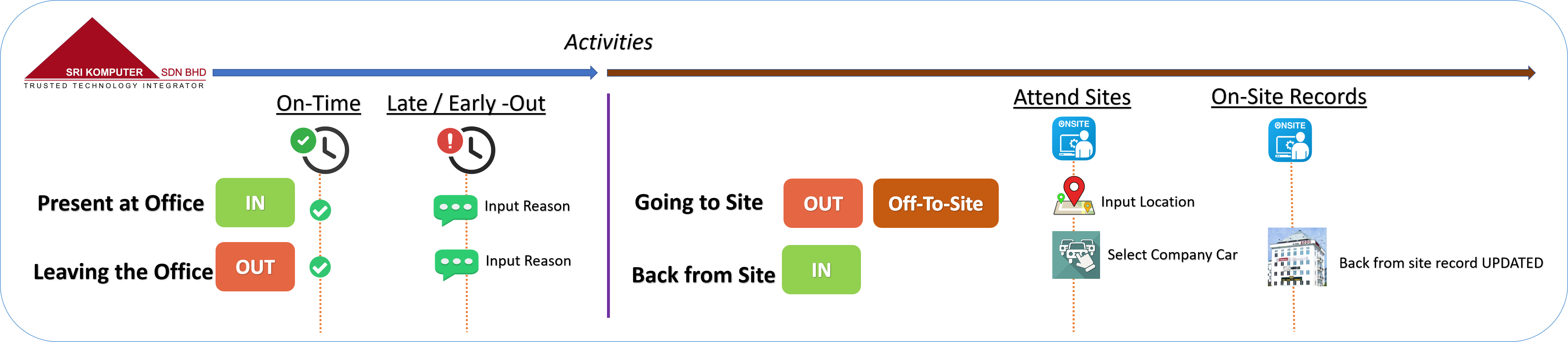
What should you do when IN/OUT Premise WISMA2020:
A) ENTERING the Office? PC Clock-In (SK-ATT)
B) EXIT the Office? PC Clock-Out (SK-ATT)
OFF-TO-SITE & REACHED On-Site? OSS -> Check-IN (OSS)
LEAVE the site? OSS -> Check-OUT (OSS) | with service ticket issued
BACK-FROM-SITE? PC Clock-In (SK-ATT)
**REMOTE/WFH = Clock-In then OFF-TO-SITE (SK-ATT)